- Table of contents
Download and install Colloquy
Download and install Colloquy from the Colloquy downloads page.
Create a new connection
Open up Colloquy. It will prompt you to create a new connection. If not, you can select File → New Connection.
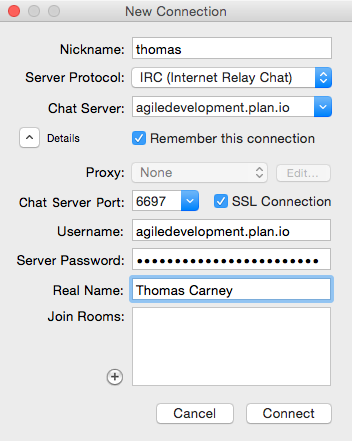
Select the Details button and enter your credentials. You'll find these credentials on in your Planio project in Chat logs.
- Nickname: enter your name
- Server Protocol: leave as IRC (Internet Relay Chat)
- Chat Server: enter the Host name
- Tick Remember this connection
- Chat Server Port: see your Planio account
- SSL Connection: make sure it’s ticked (so your chat will be secure)
- User name: enter the User name
- Server password: enter the Server password
Join the Project Room
Click Connect and you’ll be automatically joined to your project chat room.
› Probeer Planio 30 dagen gratis
Geen creditcard nodig. Aanmelden duurt maar 60 seconden.
Geen installatie Geen installatiekosten